A free 3D block puzzle for iPhone that plays offline
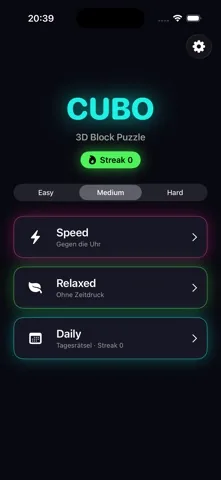
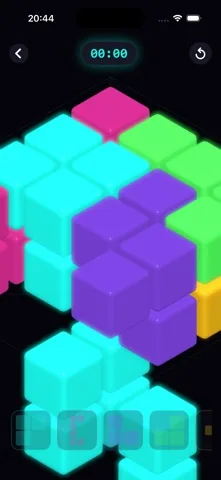
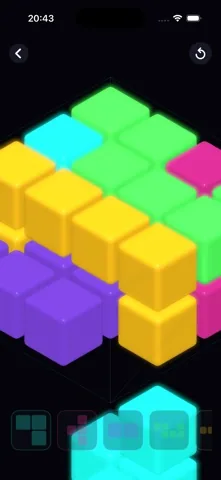
Rotate neon polycube pieces in three dimensions, line each one up with the gap, and fill the box. Speed mode, Relaxed mode and a fresh daily board, with no account and no connection.

Free on iPhone. iOS 17.0 or later.
- Free
- iPhone
- iOS 17.0 or later
- Plays offline
- No account
What you get
Five things the game actually does, taken from the build that is on the App Store.
Turn every piece in three dimensions
A piece is a small block of connected cubes. Cubo works out its distinct orientations, up to 24 of them, and the Rotate button steps through exactly those. No duplicates to scroll past.
Speed with a clock, Relaxed without one
Speed shows a running timer and stores a best time for each difficulty. Relaxed hides the clock completely. Same boards, same pieces, different pressure.
One board a day, and a streak
The daily puzzle is derived from the calendar date, so every player gets the same board that day. Solve it on consecutive days and the streak on the home screen climbs.
Generated puzzles, three board sizes
Boards are cut apart from a filled box, so every generated puzzle has a solution by construction. Easy, Medium and Hard change the box, the piece count and the piece sizes.
No account, no login, no connection
Puzzles are generated on the iPhone and your best times and streak live in a file on the device. There is no sign in screen and nothing to sync.
The three board sizes
Difficulty changes the box, the number of pieces and how large a single piece can get.
| Difficulty | Box | Cells | Pieces | Cells per piece |
|---|---|---|---|---|
| Easy | 4 by 4, one layer | 16 | 4 | 3 to 5 |
| Medium | 4 by 4, two layers | 32 | 6 | 4 to 6 |
| Hard | 5 by 5, two layers | 50 | 8 | 5 to 7 |
When people play it
On a plane or underground
Nothing about the game needs a network. Start Cubo in airplane mode and every mode, including the daily board, is there.
Two minutes in a queue
Easy is a four by four board, one layer deep, split into four pieces. That is a whole solve while the kettle boils.
Winding down at night
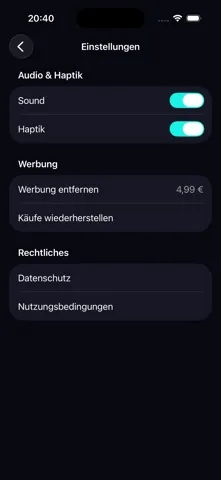
Relaxed mode has no clock and no fail state, and both sound and haptics can be switched off in Settings.
Frequently asked questions
Is Cubo free?
Yes. Cubo is free to download and free to play, and every mode is included: Speed, Relaxed, the daily puzzle, and generated puzzles across Easy, Medium and Hard. There is no subscription. Ads are what pay for the game.
Does Cubo work offline?
Yes. Cubo needs no account, no login and no connection. Every puzzle is generated on your iPhone and your best times and daily streak are stored on the device, so the game works on a plane, on the train, or anywhere with no signal.
How do you play Cubo?
Tap a piece in the tray at the bottom, tap Rotate until the shape lines up with the empty space, use the left and right arrows to step through the positions where it fits, then tap Place. Repeat until every cell of the box is filled.
What is the difference between Speed and Relaxed mode?
Speed mode shows a timer that starts with the board and freezes the moment the last piece lands, and it records a best time for each difficulty. Relaxed mode does not show a clock at all. Both modes use the same generated boards.
Does Cubo have a daily puzzle?
Yes. The daily board is derived from the calendar date in UTC, so the same puzzle reaches every player on the same day without any server. Solving it on consecutive days raises the streak shown on the home screen, and a missed day sets it back to one.
How often does Cubo show ads?
There is a banner under the home screen, and a full screen ad appears between rounds. It never interrupts a solve: it can only appear after a puzzle is finished, after at least three solves since the last one, no sooner than three minutes after the last one, and never during your first session.
Which iPhone do I need for Cubo?
Cubo runs on iPhone with iOS 17.0 or later. It is a free download from the App Store.
Read more before you install
How to play Cubo
Every control on the board: pick, rotate, position, place.
Offline 3D puzzle, no wifi
What keeps working in airplane mode, and what does not.
Soma style cube puzzle app
How Cubo builds its piece sets, and where it leaves the classic set.
Daily puzzle and streak
One board a day for everyone, and the exact streak rules.
Puzzle game with no timer
No clock, no lives, no fail state. What Relaxed mode removes.
Speed mode and best times
How the clock and the score are calculated, down to the formula.
Looking for 3D Tetris?
Nothing falls, nothing clears. What Cubo does instead.
Free download. Every mode is in the free game.